

Virtual Memory with Linux
(Usage hints for this presentation)
IT Systems, Summer Term 2026
Dr.-Ing. Matthes Elstermann
1. Looking at Memory with Linux
(Specifics of Linux are not part of learning objectives.
However, the following illustrates shared memory,
and the pseudo-filesystem /proc will be revisited in other
presentations.)
1.1. Linux Kernel: /proc/<pid>/
/procis a pseudo-filesystem- See https://man7.org/linux/man-pages/man5/proc.5.html
- (Specific to Linux kernel; incomplete or missing elsewhere)
- “Pseudo”: Look and feel of any other filesystem
- Subdirectories and files
- However, files are no “real” files but meta-data
- Interface to internal kernel data structures
- One subdirectory per process ID
- OS identifies process by integer number
- Here and elsewhere,
<pid>is meant as placeholder for such a number
- See https://man7.org/linux/man-pages/man5/proc.5.html
1.1.1. Video about /proc
1.1.2. Drawing about /proc
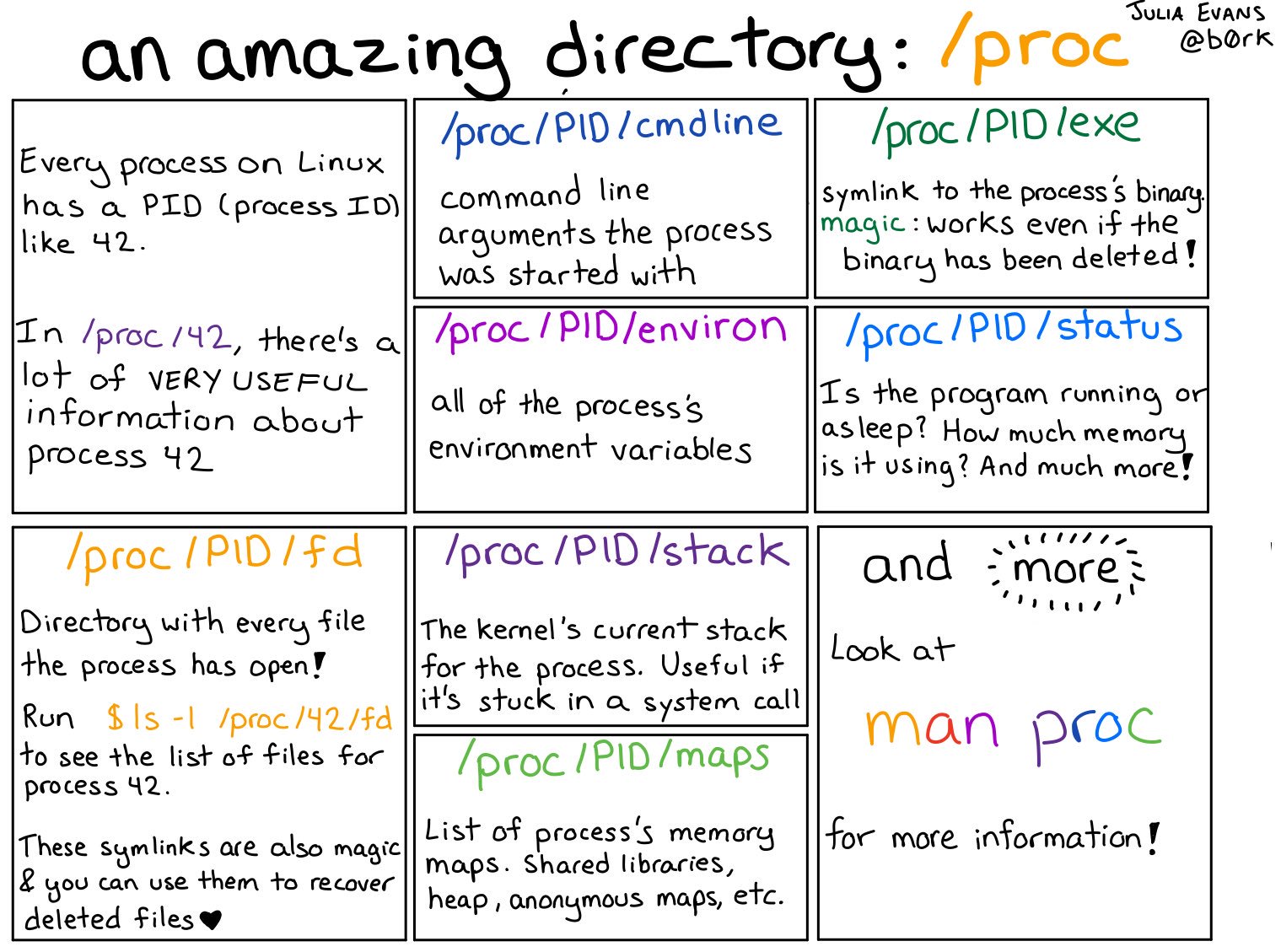
/proc
Figure © 2018 Julia Evans, all rights reserved; from julia's drawings. Displayed here with personal permission.
1.1.3. Drawing about man pages

Man pages are amazing
Figure © 2016 Julia Evans, all rights reserved; from julia's drawings. Displayed here with personal permission.
1.2. Linux Kernel Memory Interface
- Memory allocation (and much more) visible under
/proc/<pid> - E.g.:
/proc/<pid>/pagemap: One 64-bit value per virtual page- Mapping to RAM or swap area
/proc/<pid>/maps: Mapped memory regions/proc/<pid>/smaps: Memory usage for mapped regions
- Notice: Memory regions include shared libraries that are used by lots of processes
1.3. GNU/Linux Reporting: smem
- User space tool to read
smapsfiles:smem- See Blog post
- Terminology
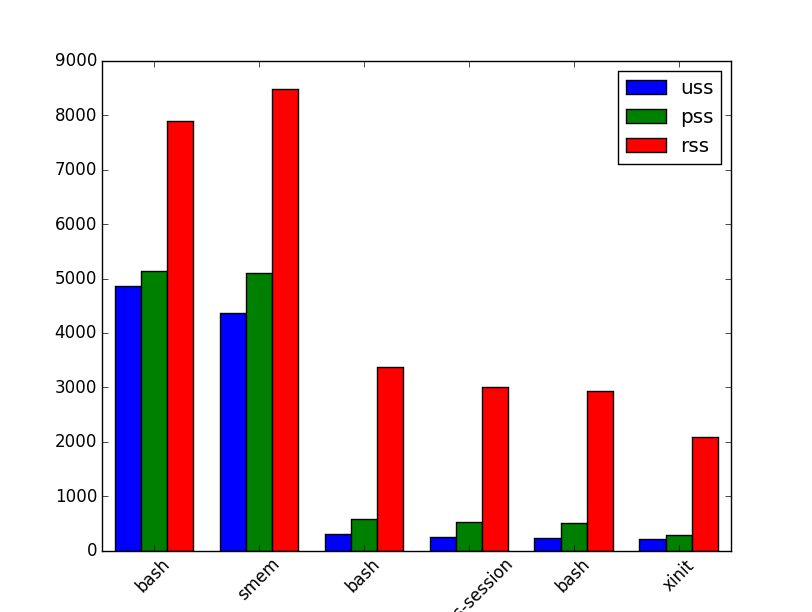
- Virtual set size (VSS): Size of virtual address space
- Resident set size (RSS): Allocated main memory
- Standard notion, yet overestimates memory usage as lots of
memory is shared between processes
- Shared memory is added to the RSS of every sharing process
- Standard notion, yet overestimates memory usage as lots of
memory is shared between processes
- Unique set size (USS): memory allocated exclusively to process
- That much would be returned upon process’ termination
- Proportional set size (PSS): USS plus “fair share” of shared pages
- If page shared by 5 processes, each gets a fifth of a page added to its PSS
1.3.1. Sample smem Output
$ smem -c "pid command uss pss rss vss" -P "bash|xinit|emacs"
  PID Command                          USS      PSS      RSS      VSS
  765 /usr/bin/xinit /etc/X11/Xse      220      285     2084    15952
 1390 /bin/bash -c libreoffice5.3      240      510     2936    13188
  826 /bin/bash /usr/bin/qubes-se      256      524     3008    13204
  750 -su -c /usr/bin/xinit /etc/      316      587     3368    21636
 1251 bash                            4864     5136     7900    26024
 2288 /usr/bin/python /usr/bin/sm     5272     6035     9432    24688
 1145 emacs                          90876    93224   106568   662768
1.3.2. Sample smem Graph

License Information
Source files are available on GitLab (check out embedded submodules) under free licenses. Icons of custom controls are by @fontawesome, released under CC BY 4.0.
Except where otherwise noted, the work “Virtual Memory with Linux”, © 2017-2022, 2024-2025 Jens Lechtenbörger, is published under the Creative Commons license CC BY-SA 4.0.